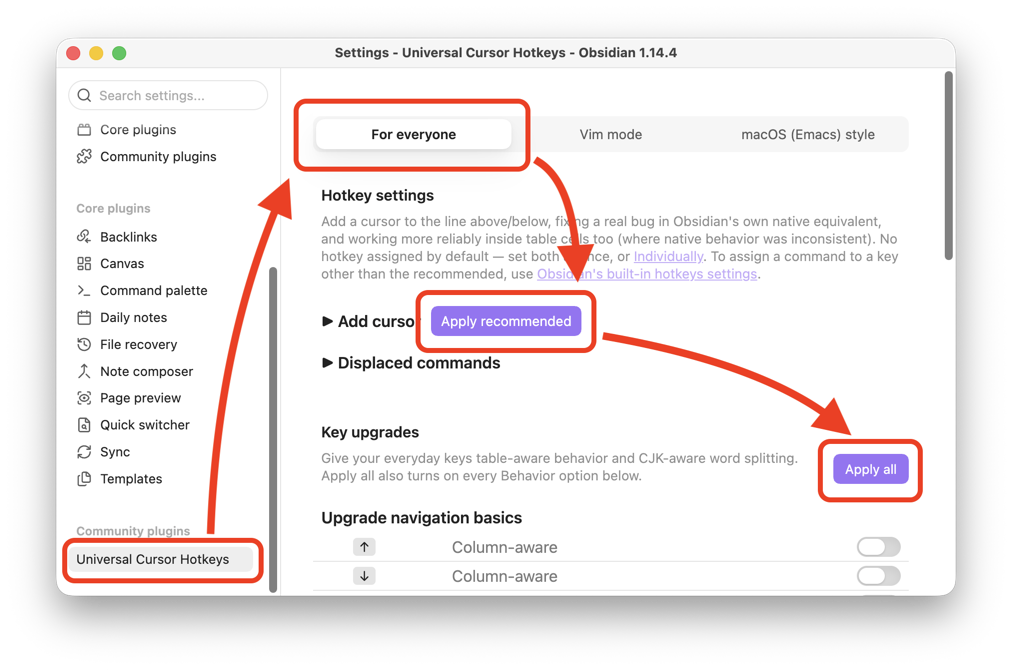
For everyone
This plugin is not just for Vim or Emacs users.
It also reimplements some of Obsidian's standard multi-cursor behavior to fix its instability.
Open Settings → Universal Cursor Hotkeys → For everyone and click the Apply recommended button under Hotkey settings.
Also, rather than a special new shortcut, it upgrades the behavior of the keys themselves, on the keyboard you already use every day.
- ↑/↓: Preserves cursor position when moving across table rows.
Home: Markdown-aware — moves to the start of the text content even on heading lines (#) or footnotes ([^1]:).Page Up/Page Down: Previously,Page Up/Page Downcould never land inside a table — turn this on and the cursor moves about one screen's worth even when that lands inside a table.Ctrl+ ←/→,Ctrl+Backspace/Delete(option+ ←/→,option+ ⌫/⌦ on macOS): Adds CJK (Chinese/Japanese) word-boundary support to word-based cursor movement and deletion.
Likewise, in the For everyone tab, click the Apply all button under Key upgrades.
See also: Command Reference | Key Upgrades | Settings | Limitations