macOS (Emacs) style
On macOS, the shortcuts control + P/N/B/F let you move the cursor within a note, but unlike the physical cursor keys, they don't work correctly inside Markdown tables. This plugin provides hotkey commands equivalent to the cursor keys, and assigning these shortcuts to them as hotkeys lets you move the cursor correctly inside tables too.
It also includes a full set of Emacs's major editing commands, so Kill & Yank (including Set-mark followed by Kill region and Yank) and Recenter become available right inside Obsidian.
Windows users will also find this plugin's commands useful if they want macOS-style cursor movement, or Emacs-style key bindings.
See also: Command Reference | Settings | Limitations
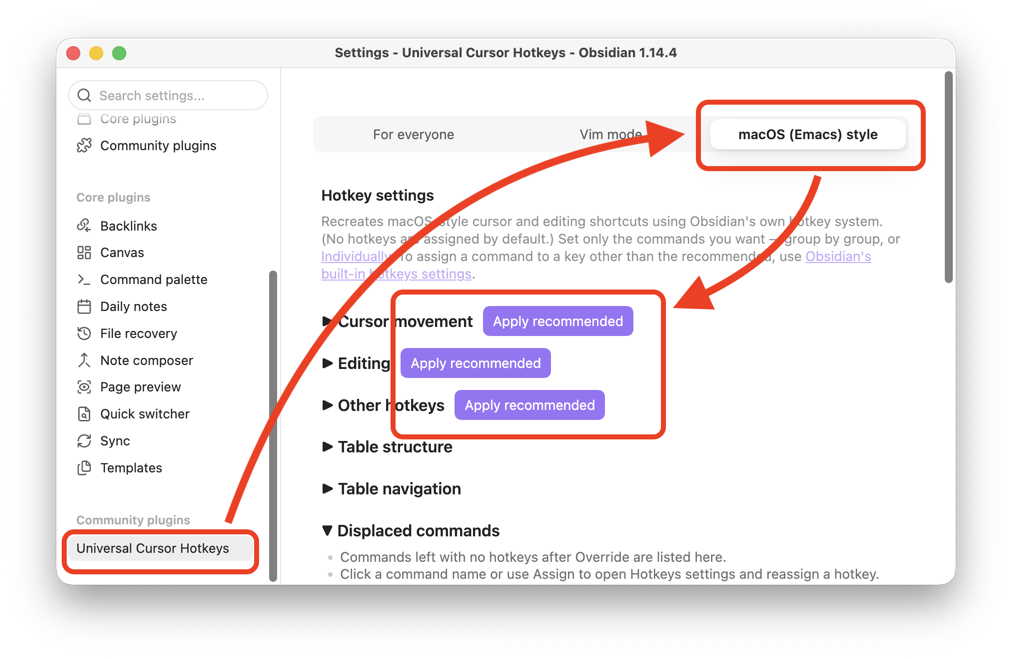
No hotkeys are assigned by default. For a minimal recommended hotkey set — cursor movement plus a few extras — Quick setup takes just three button clicks to finish.
Open Settings → Universal Cursor Hotkeys → macOS (Emacs) style and click Apply recommended for each of the three command groups — Cursor movement, Editing, and Other hotkeys. Three clicks and you're done.
Some commands go beyond simply reproducing pure Emacs functionality — they're optimized for Obsidian and enhanced for Markdown note editing. Smart home and Smart join in the demos above are features unique to a Markdown editor, which a plain text editor wouldn't have. These can also be switched back to pure, unmodified behavior via settings, so check Settings too.